AdScape: Track Your Own Ads and Your Competitors’ Ads in One Window
Naina Adhikari
Checking what your competitors advertise today means opening three or four ad libraries, one tab at a time. AdScape, a free beta tool from Tejom Digital, puts your brand and up to three competitors in one window across Meta, Google & YouTube and LinkedIn.
Here is what it shows, where its limits are, and how to read it: as a strong indication of what brands are doing, not as the last word.
The Problem: Too Many Tabs, No Single View
Every large ad platform now has a public library of ads. Meta’s Ad Library lets anyone search the active ads running across its apps. Google announced its Ads Transparency Center on 29 March 2023, covering Search, YouTube and Display. LinkedIn has an ad library of its own.
All of this is public. But each library has its own search, its own layout and its own gaps. To compare two brands you open each library, search each brand, take screenshots and paste them into a deck. Most teams do this once a quarter, if at all, and almost never for their own brand.
What AdScape Does in One Window
You open AdScape and type in your brand and up to three competitors, with the country and segment you care about. The tool reads the public ad libraries for you and lays the answers side by side.
Where each brand advertises. Which of Meta, Google & YouTube and LinkedIn each brand is active on.
Since when. The date each ad started running, so you can tell a test from a long-running campaign.
What the ads say and show. The latest creatives, with a link to every original ad in the source library.
Who runs each ad. The advertiser named in the library, which can be an agency, reseller or partner running ads for the brand.
A Sample Report: Mamaearth and Dot & Key
To show what the tool returns, we ran a report on 22 November 2026 for the Indian market, with Mamaearth as the brand and Dot & Key as the competitor. The screens below are from that report.
Read them as a sample, not a verdict. The numbers show what the tool found in the public ad libraries on that day, and Google’s library returns a limited sample. A zero or a dash for a platform can mean the library search did not match the brand’s page, not that the brand runs no ads there. Scores, goals, audience and “chance of success” are AI-assisted estimates.
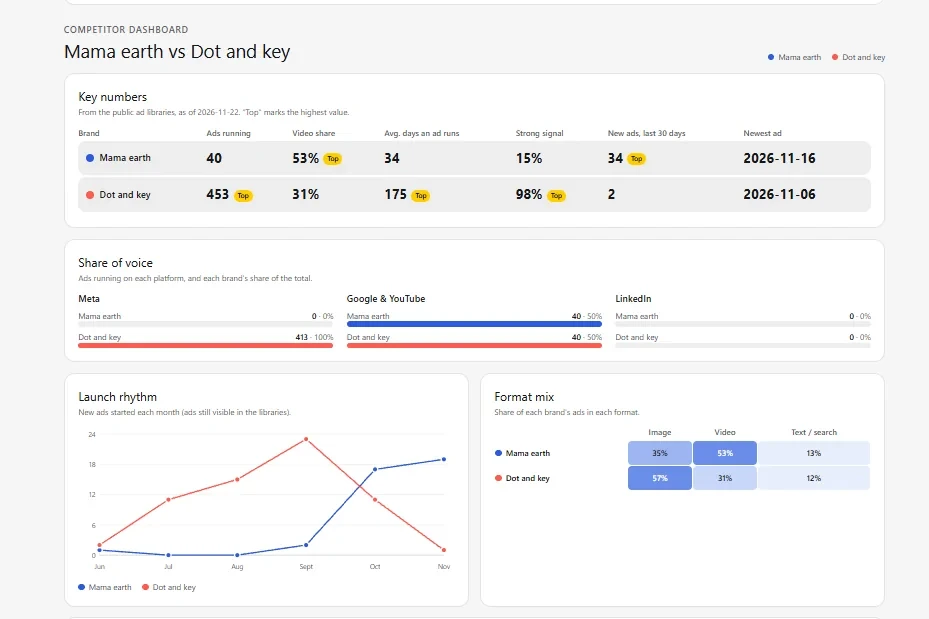
1. The dashboard. One table for ads running, video share, how long an ad runs and the date of the newest ad. Below it sit share of voice by platform, new ads by month and the format mix.
Sample AdScape report, 22 November 2026: key numbers, share of voice, launch rhythm and format mix.
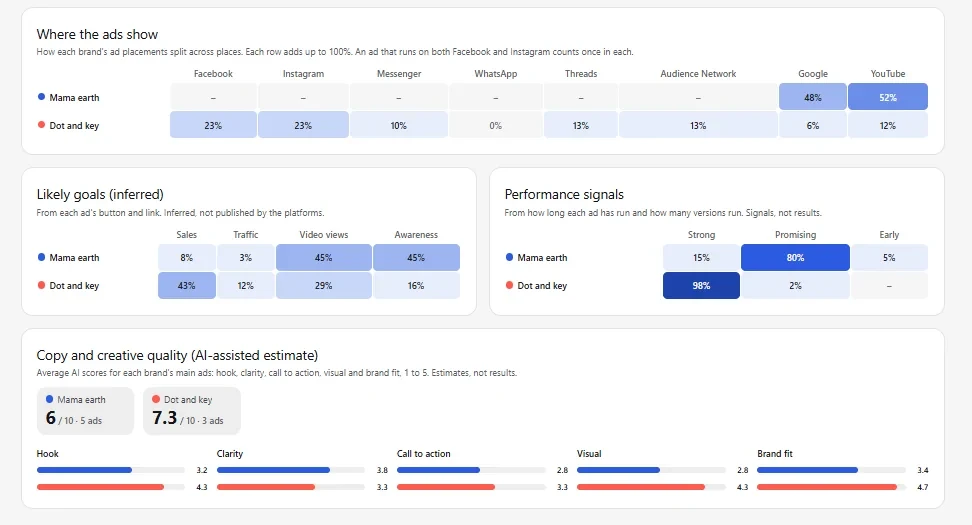
2. Where the ads show, and why. Placements across Facebook, Instagram, Google, YouTube and more. Likely goals are read from each ad’s button and link. Performance signals come from how long an ad has run and how many versions run. These are signals, not results.
Placements, likely goals (inferred), performance signals and an AI-assisted creative quality estimate.
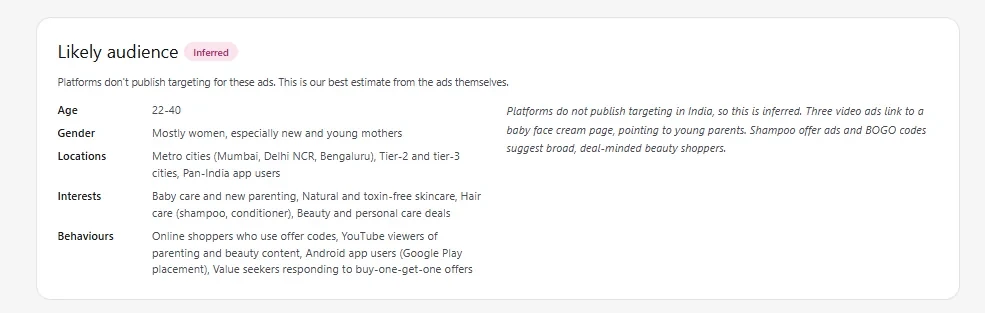
3. Who the ads seem to be for. The platforms do not publish targeting for these ads in India, so the audience is inferred from the ads themselves and marked that way.
Likely audience, clearly marked as inferred.
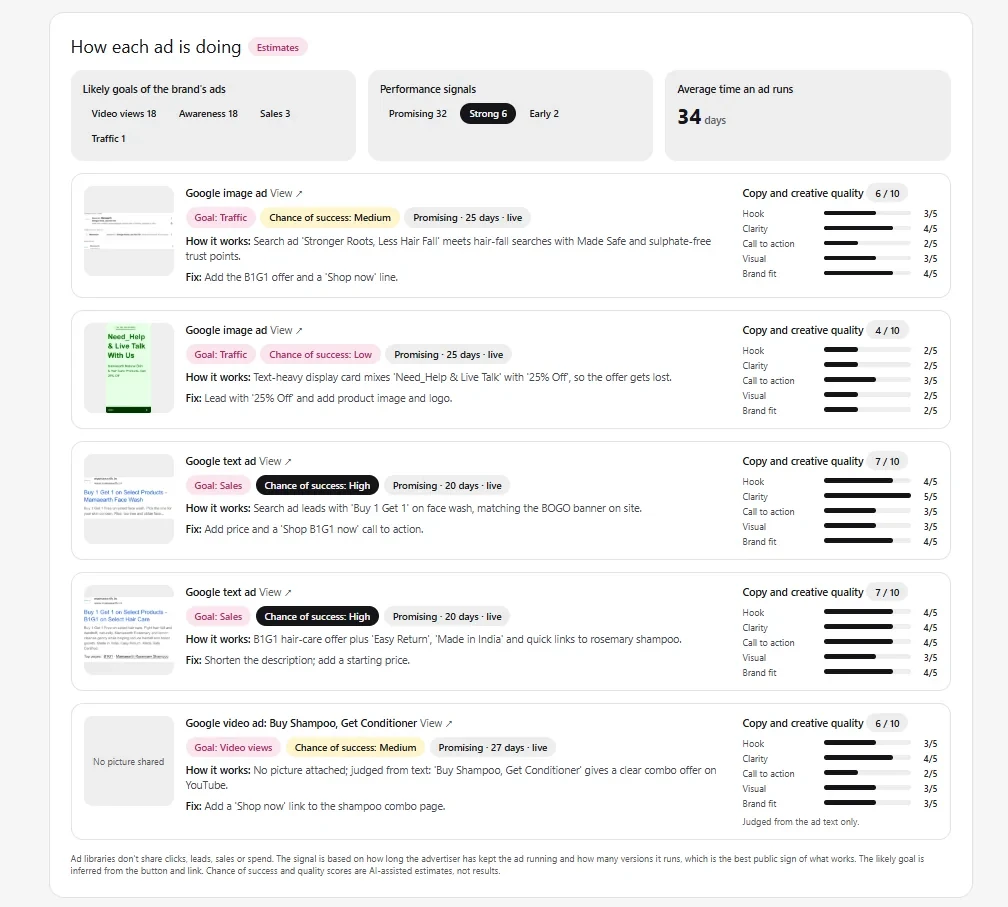
4. Ad by ad. Each ad gets its likely goal, a signal, a line on how it works and one suggested fix, with a link to the original ad.
How each ad is doing: estimates, with a suggested fix for every ad.
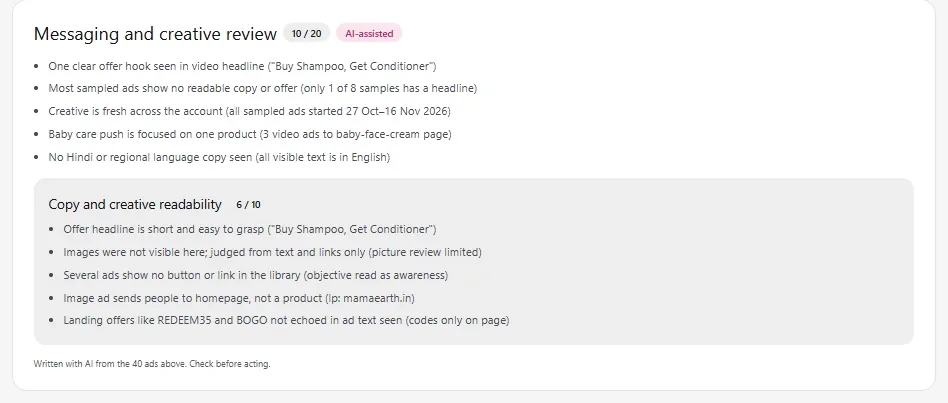
5. Messaging and creative review. A short read of what the sampled ads say, how clear the offer is and what is missing.
AI-assisted messaging and creative review.
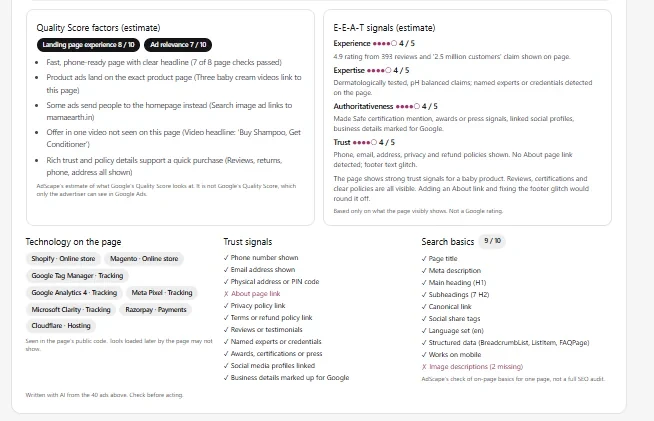
6. The landing page. Where the ads send people: page speed, trust signals, the tools installed on the page and the search basics.
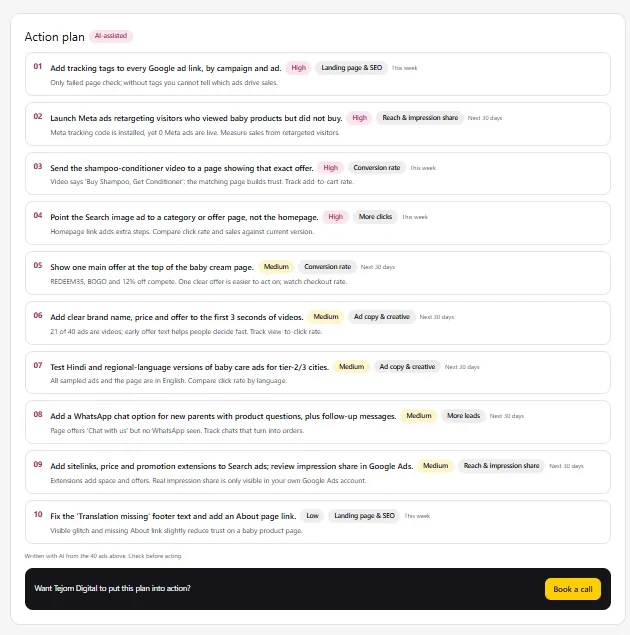
7. The action plan. Ten steps, each with a priority, the area it improves and a time frame.
A ten-point action plan with priorities and timing.
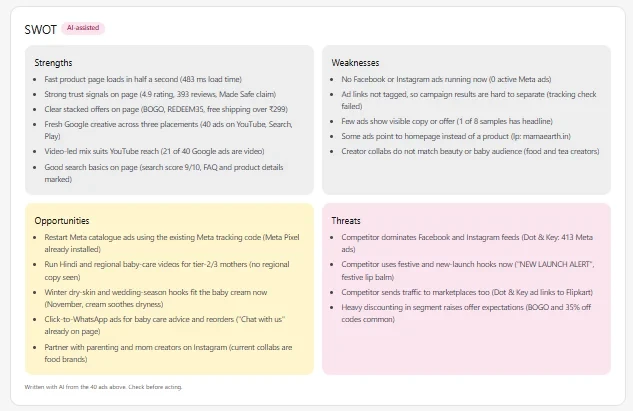
8. The SWOT. Strengths, weaknesses, opportunities and threats, written with AI from the ads and the landing page found. It is the quickest page to take into a planning meeting, and the one to check most carefully before acting.
AI-assisted SWOT from the sample report. Based only on the ads and page found on 22 November 2026.
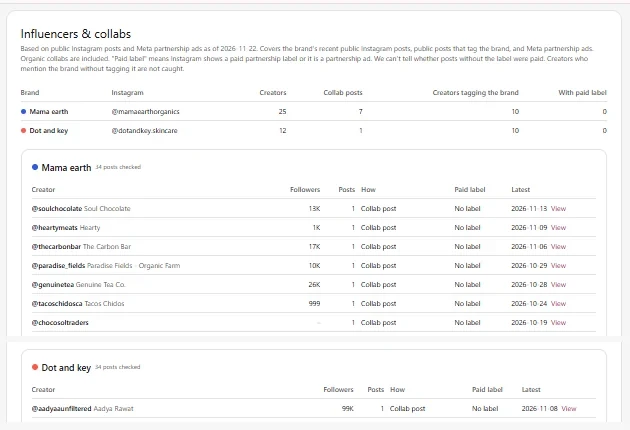
9. Influencers and collabs. The recent public Instagram collab posts found for each brand, with the creator, follower count and the date of the latest post. In this sample the dated collabs run from 19 October to 13 November 2026. The tool checks public posts only, and it cannot tell whether a post without a paid label was paid.
Influencers and collabs: recent public collab posts found for each brand, with dates.
In one sitting, a marketing manager can compare how two brands split their effort across platforms and formats, see which ads have run the longest, and leave with a list of things to test. The next step is to check those findings against your own account data.
The Features That Set It Apart
Your brand sits in the same view. Most checks look only at the competition. Seeing yourself beside them is where the gaps show.
Three platforms, one screen. No hopping between libraries or matching screenshots by hand.
Agency and partner visibility. You see who is named as the advertiser on each ad, even in the free snapshot.
A deeper report when you need it. The Brand deep-dive adds an AI-assisted score out of 100, every image and video ad found with placements and dates, and the likely audience, clearly marked as inferred.
Ready for the meeting. Reports download as PowerPoint or CSV.
Honest about what it cannot see. The tool says plainly what it does not claim, which brings us to the next point.
Read It as a Compass, Not a Bible
AdScape works from what the public ad libraries show. That makes the data indicative, and it is worth being clear about what that means.
It does not show a competitor’s spend or budgets.
It does not show their results or return.
Targeting is inferred and labelled as such, not read from the brand’s account.
It does not promise every ad a brand has ever run.
The score and next steps are AI-assisted. Treat them as an informed opinion and check before acting.
So use it the way you would use a good field report. It tells you where to look and which questions to ask. Your own account data, your sales numbers and your judgement still make the decision.
How to Use It This Week
Run a snapshot before your next plan. Especially before a festival or sale period. Our Occasions pages list the days coming up.
Audit your own brand first. Look for old ads, forgotten platforms and partners advertising in your name.
Note the long runners. An ad a competitor has kept live for months is usually one that works for them.
Take one page to the meeting. Download the report and discuss what to test, not what to copy.
Check the money side separately. Use the free marketing calculators for budgets and cost per lead.
What It Costs, and What Is Free Now
AdScape is in public beta and launches soon. Here is how it is priced.
Free snapshot. Free.
Brand deep-dive: ₹499 + GST. During the beta, the first 50 are free for business owners and marketers. It is one per company email, so pick your brands carefully.
Full audit: ₹1,499 + GST, coming soon. It adds the landing page audit, SWOT, gaps, a competitor benchmark and the step-by-step action plan.
The screens above show what a full report looks like. You can read more on the AdScape page, or go straight to the tool at adscape.tejomdigital.com.
Key Takeaways
AdScape shows your brand and up to three competitors in one window across Meta, Google & YouTube and LinkedIn.
You see where brands advertise, since when, what the ads say and who runs them.
The data comes from public ad libraries, so it is indicative, not complete.
It does not show spend, results or exact targeting.
It is in public beta: snapshots are free, and the first 50 Brand deep-dives (₹499 + GST) are free for business owners and marketers.
The Full audit (₹1,499 + GST) is coming soon.
See Your Market in One Window
Try AdScape free. Type in your brand and a few competitors and get a snapshot in about a minute.
What is AdScape? It is a competitor ad intelligence tool from Tejom Digital that shows the ads brands run on Meta, Google & YouTube and LinkedIn in one place.
Can I track my own brand as well as competitors? Yes. You enter your brand and up to three competitors, and all of them appear in the same view.
Where does the data come from? From the platforms’ public ad libraries, collected through third-party data providers. AdScape is not affiliated with Meta, Google, YouTube or LinkedIn.
Does it show how much competitors spend? No. The libraries do not show spend, results or exact targeting for most commercial ads in India, so AdScape does not guess them.
How accurate is it? It reflects what the public libraries show at the time. Treat it as indicative and check before you act.
Is AdScape free? The snapshot is free. The Brand deep-dive is ₹499 + GST, and the first 50 are free during the beta for business owners and marketers. The Full audit, at ₹1,499 + GST, is coming soon.
Meta’s proposed AI training terms were paused just fifteen days before their November 20, 2026 start date, after court orders and a regulatory investigation. Here is what actually changed, what remains in effect, and what advertisers should watch for next.
More than 6 million AI-generated Facebook pages are now indexed and ranking in Google Search, prompting SEO expert Glenn Gabe to call it “scaled content abuse.” Here’s what this AI-generated content Google search rankings story means for brands trying to protect their own visibility.
OpenAI has begun replacing Max Bid and Max CPC in ChatGPT Ads with Target CPA and Target CPC bidding, effective November 9, 2026. Here’s what changed, why it matters for performance marketers, and what to check in your account before the old options retire on January 1, 2027.
OpenAI has launched the ChatGPT Business Hub, letting companies claim a profile, track mentions and clicks, and — for eligible US businesses — build their own branded chat agent inside ChatGPT. Here’s what it actually includes, what’s still US-only, and what it signals for AI-search visibility strategy.
Google’s November 2026 bulletin confirms a new Google Business Profile message button placed right next to “Call” on Maps, plus AI-generated hours, new dietary tags, and an updated appeals tool — here’s what local businesses should check before the festive season.
Amazon has rebuilt its entire ad platform around agentic AI, now called Amazon Ads Agent. Here is exactly what it does, which features are live where, and — importantly — what is confirmed for India and what isn’t yet.
Two independent reports analyzing Diwali 2026 ecommerce order data are now available — covering 138 million order items and 80 million shipments. Here is what the confirmed numbers show, and what they mean for your Chhath Puja, Black Friday, and year-end marketing budget.
Google confirmed the google november 2026 core update on November 10, 2026, with a rollout window that could overlap Black Friday and Cyber Monday. Here’s what the update actually means, what not to panic about, and a practical two-week checklist to follow if your rankings move.
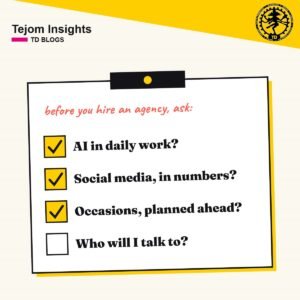
The right agency for 2026 can prove how it uses AI, what its social media delivered in numbers, and how it plans occasion campaigns. Here are the questions to ask.
World Toilet Day is on 19 November. The 2026 theme is “Safe toilets. Equal futures.” Here is what the day is about, what brands get wrong, and what to post instead.
How Gulf businesses in Qatar, Kuwait, Bahrain and Oman can reach Malayali residents with Malayalam content, Onam campaigns and WhatsApp-first communication.
How brands can mark Saudi Founding Day (22 February) and National Day (23 September) respectfully and effectively, with guidance on symbols, tone and timing.
How brands and agencies can produce enough vertical video for Saudi audiences on Snapchat and TikTok, while respecting local norms and Arabic-first design.