Performance Max Sourced Videos and Image Extraction: What Changed and How to Stay in Control

If you run Performance Max campaigns, Google Ads may already be adding your own videos to live ads without you asking it to — and from December 4, 2026, it will start doing the same with images pulled straight off your landing pages. Both changes are opt-out, not opt-in. That means the responsibility to notice, review, and decide has already shifted onto advertisers, whether or not anyone on the team has seen it happen.

This matters most right now. Diwali (November 8, 2026) has just passed, Black Friday and Cyber Monday promotions are due into Merchant Center by around November 25, and campaigns are under more scrutiny than at any other point in the year. Two account-level defaults changing in quick succession is exactly the kind of thing that gets missed in a busy quarter — and exactly the kind of thing a brand-conscious marketing team should not miss.

Performance Max Sourced Videos and Image Extraction: What Changed and How to Stay in Control

What "Sourced Videos" Actually Does

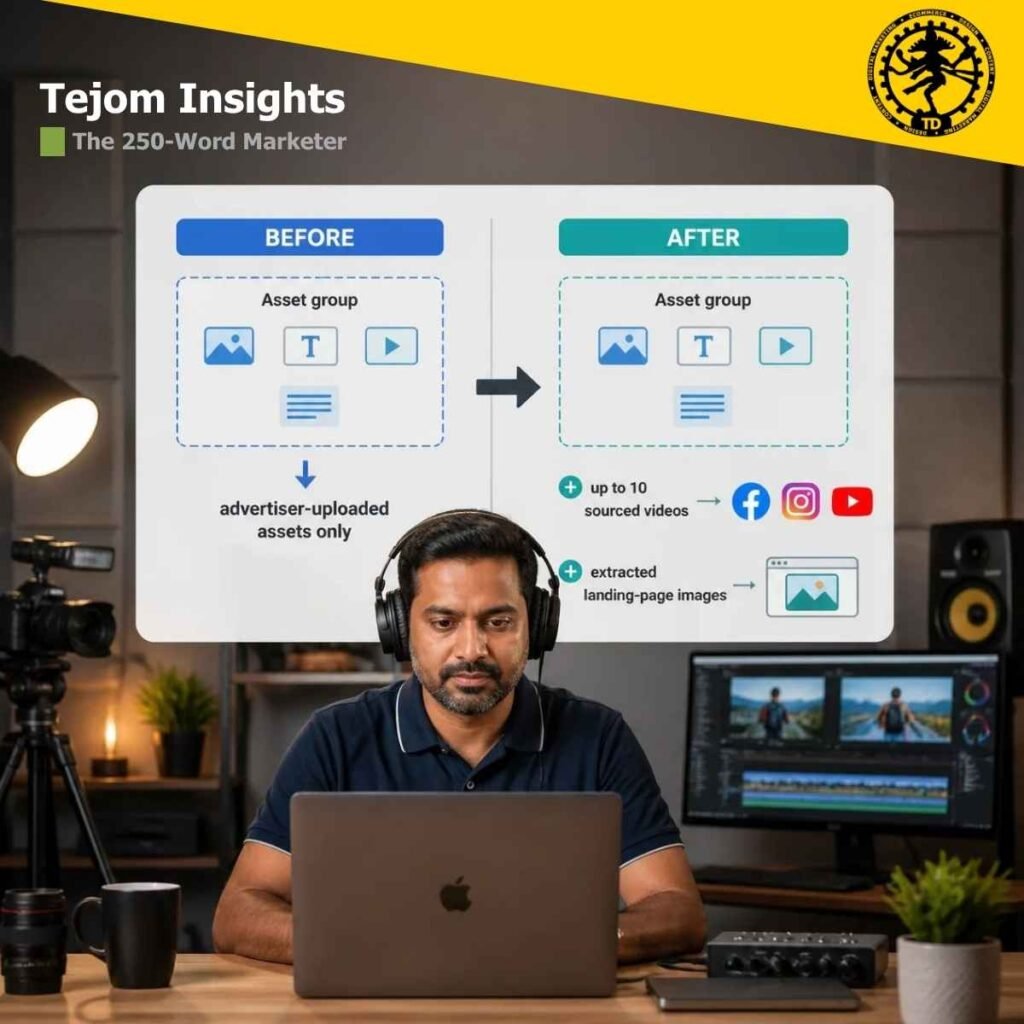
According to Google’s own Ads Help Center, Performance Max campaigns can now automatically add up to 10 “sourced videos” to a single asset group. Google’s AI identifies relevant videos from sources an advertiser approves — social media platforms, the campaign’s own landing page, and a linked YouTube channel — and inserts them alongside any videos the advertiser uploaded directly or generated using Google’s own video tools.

A few mechanics worth understanding, based on Google’s help documentation and reporting first published by PPC News Feed, PPC Land, and Search Engine Roundtable between October 21 and October 25, 2026:

  • It’s on by default for new campaigns. Google’s help page states plainly that sourced videos are enabled by default for all new campaigns created going forward.
  • Some existing campaigns may already be affected. Google has said the setting may have been switched on automatically for some existing campaigns during a recent platform update — without a specific list of which accounts or a public rollout date.
  • Google selects, not you. Videos are chosen for relevance, performance potential, and adherence to best practices such as aspect ratio, and they refresh on a recurring schedule. If a video is removed from wherever it was originally hosted, it is also removed from the ad.
  • There’s an eligibility floor. Reporting indicates the campaign needs a daily budget above $5, and Google has said the feature is rolling out in stages — so not every account will see it at once.

Where the videos end up living is unusual. According to PPC Land’s reporting, sourced videos are uploaded to a Google-owned YouTube channel branded with the advertiser’s own logo and business name, rather than the advertiser’s existing channel.

How to Turn Sourced Videos Off

Based on Google’s help documentation as reported by PPC Land:

  1. Open the relevant Performance Max campaign and select the gear icon under Campaigns.
  2. In the Asset group section, find the video option.
  3. Open the Asset optimization dropdown.
  4. Uncheck “Sourced videos.”

A “Manage sources” link in the same area lets you review and change which URLs and channels Google is allowed to pull from, even if you choose to leave the feature on.

What "Image Extraction" Changes From December 4

Separately, Google’s Ads Developer Blog — a post from the Google Ads API Team dated October 21, 2026 — confirms that image extraction (technically, GENERATE_IMAGE_EXTRACTION) becomes the default, opted-in setting for new Performance Max campaigns starting December 4, 2026. In plain terms: Google’s AI scans an advertiser’s landing pages for high-resolution images and uses them in ads that can appear on Search, YouTube, Display, Discover, Gmail, and Maps.


The detail that deserves attention: this new default overrides the account-level “Dynamic images” setting. Previously, a campaign without its own explicit setting simply inherited whatever the advertiser had chosen at the account level. From December 4, Google’s own documentation says the new campaign-level default applies “even if Dynamic Image Extensions are disabled at the account level” — so an account-wide opt-out an advertiser set up in the past will not automatically protect new campaigns created after that date.


Existing campaigns, according to Google, “will retain their current configurations” — though the developer post does not clarify what happens to a campaign with no explicit setting of its own once new account-level changes are made after December 4. That ambiguity is worth flagging to any technical team managing the account directly through the API.

How to Opt Out of Image Extraction

For teams managing campaigns through the Google Ads API, Google’s own developer post describes the opt-out mechanism:

  • Before December 4, for new campaigns:

    include an asset_automation_settings entry with AssetAutomationType set to GENERATE_IMAGE_EXTRACTION and AssetAutomationStatus set to OPTED_OUT in the campaign creation payload.
  • For existing campaigns:

    Google’s documentation warns that updates replace the entire settings array rather than merging with what’s already there. Read the current array first and re-include every other entry — such as TEXT_ASSET_AUTOMATION — or those settings may be wiped out unintentionally.
  • To audit an account:

    Google provides a GAQL query selecting campaign.asset_automation_settings for Performance Max campaigns. Any campaign without a GENERATE_IMAGE_EXTRACTION entry is still following the account-level setting.
  • Through the UI:

    the account-level “Dynamic images” control sits under Campaigns, then Assets, then Account-level automated assets, then Advanced settings — though Google’s post does not specify which API resource exposes that same setting for programmatic access.

Google’s post also asks advertisers to confirm they hold the rights to use landing-page images commercially — a detail worth passing on to any legal or brand team before December 4, not after.

Why This Matters Beyond the Technical Detail

Both changes share a pattern that is becoming familiar across Google Ads in 2026: new automation ships opt-out by default, documented quietly on a help page or developer blog rather than announced with fanfare, and the burden of noticing falls on the advertiser. This project has already covered a related example — Automated Promotions, which scans a website for discounts and attaches them to ads without manual setup — and the pattern is consistent: review your settings proactively, on a schedule, rather than assuming yesterday’s configuration still holds.


For brand-conscious advertisers, the real question these changes raise is not just “can I turn this off,” but “do I know, right now, whether it’s already on.” Neither Google’s help documentation nor its developer blog post gives a reason for either change, a full list of affected existing campaigns, or independent, India-specific rollout data — all genuine gaps that should be treated as open questions, not assumptions, until Google documents them more fully.

Key Takeaways

  • • Sourced videos (up to 10 per asset group) are already on by default for new Performance Max campaigns, and may be live on some existing campaigns without separate notice.
    • Image extraction becomes the default for new campaigns from December 4, 2026, and this new default overrides any account-level Dynamic Images opt-out.
    • Both changes are opt-out, not opt-in — review, don’t assume.
    • The opt-out for sourced videos is a UI toggle; the opt-out for image extraction, on new campaigns, needs to be set at campaign creation through the API, the UI, or Google Ads Editor.
    • Neither change has a confirmed reason, a full list of affected accounts, or India-specific detail published by Google as of this writing.

Take Control of Your Performance Max Campaigns.

Don’t let unexpected AI defaults dictate your brand’s visual identity or alter your holiday campaign strategy. Whether you need to audit your current settings, opt out of automatic video and image extraction, or build a tailored asset strategy that keeps your brand protected, our Google Ads experts are here to help.

A 15-minute session?

Take the first step toward future-proof growth:

  • For a Direct Business Query: Call us at  99034 72194

  • For a Quick Consultation: WhatsApp our team at 79807 31010

FAQs

  1. What is “sourced videos” in Performance Max?
    A feature that lets Google’s AI automatically add up to 10 videos from approved sources — social platforms, your landing page, and your linked YouTube channel — to a Performance Max asset group, without you uploading them yourself.
  2. Is sourced videos on by default?
    Yes, for new campaigns, according to Google’s own help documentation. Some existing campaigns may have had it switched on automatically during a recent platform update.
  3. How do I turn off sourced videos?
    Open the campaign’s gear icon under Campaigns, go to the Asset group section, open Asset optimization, and uncheck “Sourced videos.”
  4. What is Performance Max image extraction?
    A setting (GENERATE_IMAGE_EXTRACTION) that lets Google’s AI scan your landing pages for high-resolution images and use them in ads across Search, YouTube, Display, Discover, Gmail, and Maps.
  5. When does image extraction become the default?
    From December 4, 2026, for new Performance Max campaigns, per Google’s Ads Developer Blog.
  6. Does my existing account-level “Dynamic images” setting protect new campaigns?
    No. Google’s documentation states the new campaign-level default for image extraction applies even if Dynamic Image Extensions are disabled at the account level.
  7. How do I opt new campaigns out of image extraction?
    Before creating the campaign, include an asset_automation_settings entry with AssetAutomationType GENERATE_IMAGE_EXTRACTION and AssetAutomationStatus OPTED_OUT, whether through the API, Google Ads Editor, or the UI.
  8. Will opting out affect my other automated asset settings?
    It can, if done incorrectly through the API — updating a campaign’s settings replaces the entire array, so you need to re-include every other setting you want to keep, such as text asset automation.
  9. Where do sourced videos actually get hosted?
    According to reporting on Google’s help documentation, sourced videos are uploaded to a Google-owned YouTube channel branded with the advertiser’s own logo and business name, not the advertiser’s existing channel.
  10. Is there a minimum budget for sourced videos to appear?
    Reporting indicates a daily budget above $5 is required, and Google has said the feature is rolling out in stages, so timing will vary by account.
  11. Has Google explained why it’s making these changes?
    No. Neither Google’s help documentation nor its developer blog post gives a stated reason for either change, and no India-specific detail has been published as of this writing.
  12. Should I turn these off, or leave them on?
    That depends on your brand’s risk tolerance and creative control requirements — there’s no universal right answer. Review what Google would actually publish under each setting before deciding, rather than leaving the default unexamined.

#GoogleAds #PerformanceMax #PPC #DigitalMarketingIndia #BrandSafety #GoogleAdsAutomation #PaidMedia #MarTech #SEMIndia #TejomDigital

Is AI Search Visibility Worth It? What 3 New Studies Found
The 250-Word Marketer
Naina Adhikari

Is AI Search Visibility Worth It? What 3 New Studies Found

Three independent 2026 studies measured real website traffic and conversions from ChatGPT, Gemini, and other AI assistants against Google organic search — and found AI assistants send a small fraction of the traffic, though the visitors they do send often convert differently. Here’s what the data actually shows, what it doesn’t prove, and how to use it to plan your 2027 marketing budget.

Read More »
Chhath Puja 2026 Marketing Strategy: Beyond the Diwali Afterthought
The 250-Word Marketer
Naina Adhikari

Chhath Puja 2026 Marketing Strategy: Beyond the Diwali Afterthought

Diwali 2026 just wrapped. For brands with any reach into Bihar, Jharkhand, or eastern UP communities, Chhath Puja — falling November 13-16 — is a second, genuinely separate festive moment. Here’s a chhath puja 2026 marketing strategy built on what brands actually did last year, not assumptions.

Read More »