


Tejom Digital Awarded top 10 Advertising Startup for 2022 by Silicon India - Start Up City
Tejom-Digital-Digital-Marketing-Agency- is an registered MSME

आ नो भद्राः क्रतवो यन्तु विश्वतः

Let noble thoughts come from all directions

Google Ads Holistic Mode vs Growth Mode – New Budget Tool Explained

Google has added two new ways to let its Recommendations page reallocate your Google Ads budget: Holistic Mode and Growth Mode. Both live inside the “Recommended Investment Strategy” tab, a tool built to suggest — and, if you approve, apply — budget changes across your campaigns based on where they’re likely to perform best.

This matters right now because of timing. The update landed on September 23–24, 2026, about three weeks before Durga Puja and seven weeks before Diwali — the two highest-demand shopping windows on the Indian retail calendar. Many performance marketing teams are already deciding how to move budget between campaigns for the festive quarter. This tool gives Google’s own systems a direct, semi-automated way to do part of that job — which makes understanding exactly what it does, and doesn’t do, worth ten minutes before you touch it.

Google Ads Holistic Mode vs Growth Mode - New Budget Tool Explained

Where to Find It

The Recommended Investment Strategy tool sits under Recommendations in the Campaigns menu of your Google Ads account, in the Investment Strategy tab. It becomes available once at least one eligible campaign — currently Performance Max and Search campaigns using Smart Bidding — is either budget-constrained (losing opportunity because its budget caps it) or has meaningful headroom to convert more at a favorable cost.

Holistic Mode: Reallocating What You Already Spend

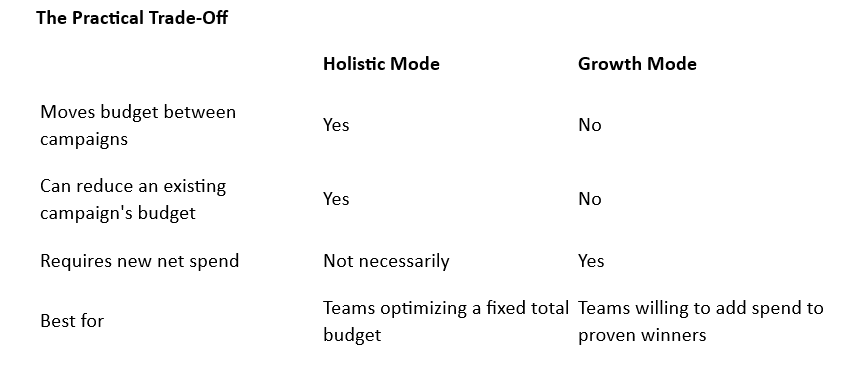
Holistic Mode is the mode Google labels as its default recommendation. It looks across your eligible campaigns and reallocates existing budget — taking some away from underperforming or underutilized campaigns and adding it to your strongest performers. According to the reporting reviewed for this article, Holistic Mode can add some additional weekly spend on top of that reallocation, but its core mechanic is redistribution: money moves from campaigns doing less with it to campaigns that could do more.

For a business with a fixed total ad budget who wants better results without spending more, this is the more conservative option in one sense (no new net spend) and the more disruptive option in another (some campaigns will see their budgets cut).

Growth Mode: Adding Budget Without Touching the Rest

Growth Mode takes a narrower approach. It adds new budget specifically to campaigns that are constrained by their current budget cap and shows signs they could convert more at an acceptable cost or return. Critically, based on the reporting reviewed, Growth Mode does not reduce any existing campaign’s budget — it only adds. That makes it the safer option if you don’t want the tool touching campaigns you’ve deliberately budgeted a certain way, such as a brand campaign you’re intentionally running lean.

The Practical Trade-Off

Both modes let you set a goal — clicks, conversions, or conversion value — and enter either additional weekly spend or a target result increase. Google then shows a forecast table of the suggested changes and their estimated impact before you apply anything. Nothing changes in your account until you actively approve the suggestion.

Where to Be Careful

A few situations deserve extra scrutiny before accepting a recommendation from either mode, based on the documented caveats in the reporting reviewed:

  • Brand search campaigns. These can look “underutilized” to an automated tool even when running exactly as intended, because their job (capturing existing demand cheaply) doesn’t always show the growth signals the tool is looking for. Don’t let Holistic Mode quietly defund a brand campaign that’s doing its job.
  • Campaigns relying on offline conversion data. If a campaign’s real value comes from offline sales the tool can’t see (a showroom visit, a phone order), its true performance may look worse than it is — and it could be flagged as underperforming when it isn’t.
  • Long sales-cycle B2B or high-ticket campaigns. The tool’s forecast window is short (around seven days), which fits fast-converting e-commerce campaigns far better than a B2B campaign with a multi-week decision cycle.

How This Fits Into Festive-Quarter Planning

If you’ve already built a festive-season Google Ads checklist covering seasonality adjustments, seasonal budget adjustments, and asset group readiness, this tool is a different layer: it’s about how much budget sits where across your account, not how a single campaign behaves during a short event window. Reviewing Investment Strategy recommendations now — while you can still watch a week or two of results before Durga Puja demand peaks — gives you time to catch a bad reallocation before it costs you during the highest-value weeks of the year.

Key Takeaways

  • Google Ads’ new Recommended Investment Strategy tool offers two budget-reallocation modes: Holistic (moves existing budget, can cut some campaigns) and Growth (only adds new budget, never cuts).
  • Both apply to Performance Max and Smart Bidding Search campaigns and require your explicit approval before any budget actually changes.
  • Brand campaigns, offline-conversion-dependent campaigns, and long B2B sales cycles are the situations most likely to be misread by either mode’s short forecast window.
  • With Durga Puja three weeks away and Diwali seven weeks away, now is a reasonable time to review — not blindly accept — any recommendation this tool surfaces in your account.
  • This is a genuinely new tool as of September 2026; treat early guidance (including this article) as first-look analysis, not exhaustive documentation.

Google just quietly added two new ways to let its own system move your ad budget around. Have you noticed?

Holistic Mode and Growth Mode. One can cut some campaigns to boost others. The other only adds. Here’s the real difference, and why it’s worth understanding before you lock your festive-season budget.

A 15-minute session?

Take the first step toward future-proof growth:

  • For a Direct Business Query: Call us at  99034 72194

  • For a Quick Consultation: WhatsApp our team at 79807 31010

FAQs

  1. What is Google Ads’ Recommended Investment Strategy tool?
    It’s a feature inside the Recommendations page (Investment Strategy tab) that analyzes your Performance Max and Smart Bidding Search campaigns and suggests budget changes — under either Holistic Mode or Growth Mode — that you can review and choose to apply.
  2. What’s the actual difference between Holistic Mode and Growth Mode?
    Holistic Mode reallocates budget across your campaigns, which can reduce some campaigns’ budgets to increase others. Growth Mode only adds new budget to constrained, well-performing campaigns and does not reduce any existing campaign’s budget.
  3. Which campaign types support these new modes?
    Based on the reporting reviewed for this article, Performance Max campaigns and Search campaigns using Smart Bidding strategies are eligible. Other campaign types were not mentioned as supported as of this writing.
  4. Do these changes apply automatically, or do I have to approve them?
    You have to approve them. The tool generates a recommendation and a forecast; nothing changes in your account budgets until you actively accept the suggestion.
  5. Will Holistic Mode cut my brand campaign’s budget without warning?
    It could recommend reducing it if the campaign looks underutilized to the tool — which is exactly why brand campaigns deserve manual review before you accept any Holistic Mode recommendation, rather than accepting it by default.
  6. Is this the same thing as seasonality adjustments or seasonal budget adjustments?
    No. Those are separate, older Google Ads features that tell Smart Bidding to expect a different conversion rate, or temporarily raise a single campaign’s daily budget for a scheduled window. Holistic and Growth modes work at a broader, cross-campaign budget-allocation level.
  7. Should I use this before Durga Puja and Diwali, or wait until after?
    Reviewing recommendations now gives you time to watch a week or two of results before the festive peak and correct course if a reallocation isn’t working. Waiting until the last week of October to make major budget changes leaves little room to recover from a bad call.
  8. Does this tool see offline sales when deciding what’s “underperforming”?
    Not necessarily. If a campaign’s real value includes offline conversions the tool can’t measure, it may look less efficient than it actually is — a reason to review, not blindly accept, any recommendation touching that campaign.
  9. Is Growth Mode the “safer” option?
    It’s safer in the specific sense that it won’t cut any existing campaign’s budget. It does require adding new spend, so it isn’t “safer” in a budget-neutral sense — it’s a different kind of risk (spending more) rather than no risk at all.
  10. Where exactly do I find this in my Google Ads account?
    Go to Recommendations in the Campaigns menu, then open the Investment Strategy tab. The option appears when at least one eligible campaign is budget-constrained or shows room for more conversions at a good cost.
  11. Is this feature confirmed to be available in India?
    The reporting reviewed for this article did not specify a country-limited rollout, and Google Ads account-level features are typically available globally unless stated otherwise — but this has not been independently confirmed against Google’s own help page for this article, given the access restriction noted in the sources section below. Confirm directly in your own account.

#TejomDigital #GoogleAds #PPC #PerformanceMarketing #DigitalMarketingIndia #FestiveSeason2026 #EcommerceMarketing #GrowthMarketing #SmartBidding #PerformanceMax #MarketingStrategy

CTV Programmatic Streaming Ads: The New Era
The 250-Word Marketer
Naina Adhikari

CTV Programmatic Streaming Ads: The New Era

Discover how CTV programmatic streaming ads bridge programmatic precision and big-screen impact. Learn how brand leaders capture silent-scroll audiences using 3-second hooks, kinetic typography, and omnichannel retargeting.

Read More »

Cheap Agencies, Costly Mistakes: How Unlicensed Content Can Tank Your Brand

In an era where digital content moves at breakneck speed, cutting corners with budget agencies or unvetted freelancers can invite catastrophic legal liability. This ready reckoner breaks down how unlicensed stock photos, stolen vectors, and unverified media assets can result in hefty copyright penalties under Section 63 of the Indian Copyright Act, forced rebrands, and lasting reputational fallout.

Read More »